Analysis runs in the browser. Student data is processed on your device and is not uploaded to a server.
Analyze
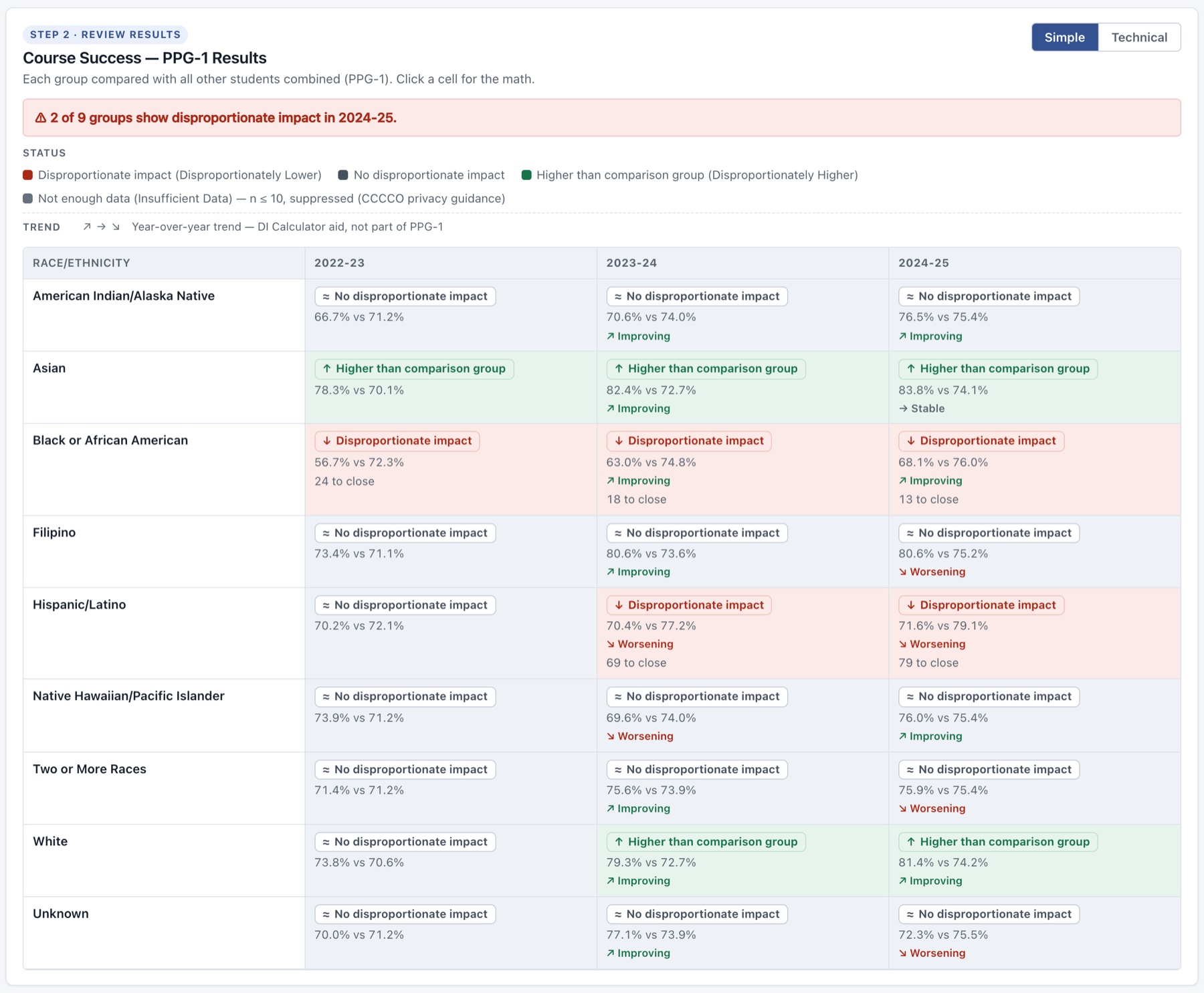
PPG-1 disproportionate impact for Success and Retention outcomes, from student-level records or aggregate
counts, with custom analysis dimensions and intersectional analysis.
Protect
Small-group and complementary suppression in exported and printed output, to reduce the risk of revealing
small groups.
Explore
Academic Year and Term views, filters, and Simple and Technical result modes.
Export
CSV and printable reports that carry the same privacy protections.
Built for California Community College research workflows
DI Calculator is designed for institutional researchers, equity teams, administrators, and others who need to
conduct PPG-1 disproportionate impact analysis without building calculations from scratch.
Privacy
DI Calculator processes analysis data locally in the browser; files are not uploaded. Before using
institutional data, follow your college or district’s applicable privacy, security, and data-use
policies.
DI Calculator supports local PPG-1 analysis and analytical extensions. It is not an official California
Community Colleges Chancellor’s Office reporting or submission system and does not reproduce every
SEA/SEP reporting procedure.